<?xml version="1.0" encoding="utf-8"?><feed xmlns="http://www.w3.org/2005/Atom" ><generator uri="https://jekyllrb.com/" version="3.9.5">Jekyll</generator><link href="https://caltong.com/feed.xml" rel="self" type="application/atom+xml" /><link href="https://caltong.com/" rel="alternate" type="text/html" /><updated>2024-03-18T09:09:07+00:00</updated><id>https://caltong.com/feed.xml</id><title type="html">Cal’s Blog</title><subtitle>Just a writing place...</subtitle><entry><title type="html">Multiplex Ethernet Cable Using Managed Switch</title><link href="https://caltong.com/2024/03/18/multiplex-ethernet-cable-using-managed-switch.html" rel="alternate" type="text/html" title="Multiplex Ethernet Cable Using Managed Switch" /><published>2024-03-18T08:30:00+00:00</published><updated>2024-03-18T08:30:00+00:00</updated><id>https://caltong.com/2024/03/18/multiplex-ethernet-cable-using-managed-switch</id><content type="html" xml:base="https://caltong.com/2024/03/18/multiplex-ethernet-cable-using-managed-switch.html"><![CDATA[<h1 id="multiplex-ethernet-cable-using-managed-switch">Multiplex Ethernet Cable Using Managed Switch</h1>

<p>Recently I moved to an apartment with a very limited network infrastructure for my personal use. There is only one ethernet 
cable between the network case and the living room where I decided to put my TV and wireless router.</p>

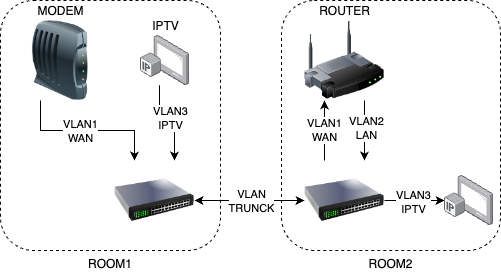
<p>This situation requires me to multiplex the only one cable in the wall. After some study about the managed switch and the 
VLAN technology. I have built a home network like the below structure. For now, I’m fully satisfied with this solution.</p>

<p><img src="/assets/img/in-post/2024-03-18-multiplex-ethernet-cable-using-managed-switch/network-structure.drawio.png" alt="network-structure.drawio.png" /></p>]]></content><author><name></name></author><summary type="html"><![CDATA[Multiplex Ethernet Cable Using Managed Switch]]></summary></entry><entry><title type="html">Be Careful With Executor In Springboot</title><link href="https://caltong.com/2024/01/18/be-careful-with-executor-in-springboot.html" rel="alternate" type="text/html" title="Be Careful With Executor In Springboot" /><published>2024-01-18T12:31:00+00:00</published><updated>2024-01-18T12:31:00+00:00</updated><id>https://caltong.com/2024/01/18/be-careful-with-executor-in-springboot</id><content type="html" xml:base="https://caltong.com/2024/01/18/be-careful-with-executor-in-springboot.html"><![CDATA[<h1 id="be-careful-with-executor-in-springboot">Be Careful With Executor In Springboot</h1>

<p>When using a thread pool executor as a component like below codes, 
Spring will shut down this executor when Spring is shutting down.</p>
<div class="language-java highlighter-rouge"><div class="highlight"><pre class="highlight"><code><span class="nd">@Bean</span>
<span class="kd">public</span> <span class="nc">ThreadPoolExecutor</span> <span class="nf">executor</span><span class="o">()</span> <span class="o">{</span>
    <span class="k">return</span> <span class="k">new</span> <span class="nf">ThreadPoolExecutor</span><span class="o">(</span><span class="mi">4</span><span class="o">,</span> <span class="mi">4</span><span class="o">,</span>
        <span class="mi">60</span><span class="o">,</span> <span class="nc">TimeUnit</span><span class="o">.</span><span class="na">SECONDS</span><span class="o">,</span>
        <span class="k">new</span> <span class="nc">ArrayBlockingQueue</span><span class="o">&lt;&gt;(</span><span class="mi">10</span><span class="o">),</span>
        <span class="k">new</span> <span class="nc">ThreadPoolExecutor</span><span class="o">.</span><span class="na">DiscardPolicy</span><span class="o">());</span>
    <span class="o">}</span>
</code></pre></div></div>
<p>But if creating executor like below codes, there will be a problem.</p>
<div class="language-java highlighter-rouge"><div class="highlight"><pre class="highlight"><code><span class="nc">ThreadPoolExecutor</span> <span class="n">executor</span> <span class="o">=</span> <span class="k">new</span> <span class="nc">ThreadPoolExecutor</span><span class="o">(</span><span class="mi">4</span><span class="o">,</span> <span class="mi">4</span><span class="o">,</span>
                            <span class="mi">60</span><span class="o">,</span> <span class="nc">TimeUnit</span><span class="o">.</span><span class="na">SECONDS</span><span class="o">,</span>
                            <span class="k">new</span> <span class="nc">ArrayBlockingQueue</span><span class="o">&lt;&gt;(</span><span class="mi">10</span><span class="o">),</span>
                            <span class="k">new</span> <span class="nc">ThreadPoolExecutor</span><span class="o">.</span><span class="na">DiscardPolicy</span><span class="o">());</span>
<span class="n">executor</span><span class="o">.</span><span class="na">execute</span><span class="o">(()-&gt;{</span>
    <span class="c1">//sample runnable</span>
        <span class="o">});</span>
</code></pre></div></div>
<p>In this case, Spring won’t be shut down successfully due to this executor can’t be shut down automatically.
Spring will wait this executor endlessly.</p>

<p>Therefore, remember shut down executor explicitly by calling <code class="language-plaintext highlighter-rouge">executor.shutdown()</code>.
This method will let Spring shut down smoothly.</p>]]></content><author><name></name></author><summary type="html"><![CDATA[Be Careful With Executor In Springboot]]></summary></entry><entry><title type="html">PostgreSQL Database Object Size Functions</title><link href="https://caltong.com/2024/01/02/postgresql-database-object-size-functions.html" rel="alternate" type="text/html" title="PostgreSQL Database Object Size Functions" /><published>2024-01-02T14:55:00+00:00</published><updated>2024-01-02T14:55:00+00:00</updated><id>https://caltong.com/2024/01/02/postgresql-database-object-size-functions</id><content type="html" xml:base="https://caltong.com/2024/01/02/postgresql-database-object-size-functions.html"><![CDATA[<h1 id="postgresql-database-object-size-functions">PostgreSQL Database Object Size Functions</h1>

<p>PG provides us several database object size functions to calculate the disk space usage of database objects. Such as:</p>
<ul>
  <li>pg_database_size()</li>
  <li>pg_indexes_size()</li>
  <li>pg_relation_size()</li>
  <li>pg_table_size()</li>
  <li>pg_total_relation_size()</li>
</ul>

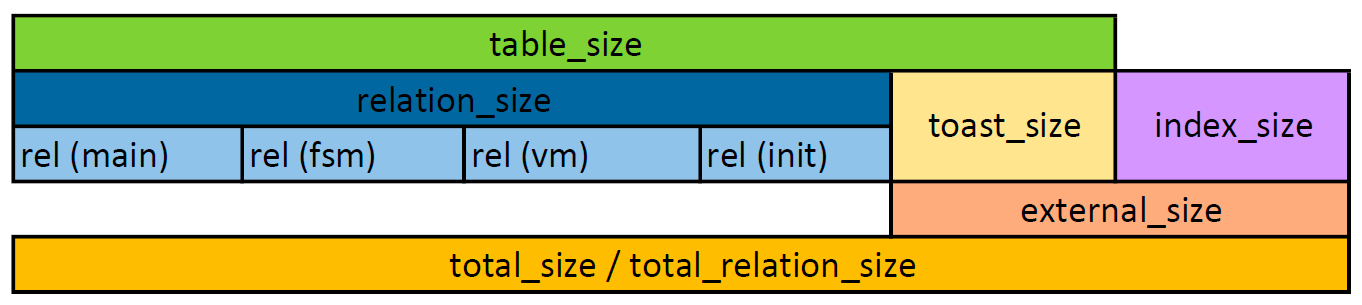
<p>The image below shows very clear about the definition of those functions. Thanks the answer from Satish Patro in this stack overflow question.</p>

<p><a href="https://stackoverflow.com/questions/41991380/whats-the-difference-between-pg-table-size-pg-relation-size-pg-total-relatio">What’s the difference between pg_table_size, pg_relation_size &amp; pg_total_relation_size? (PostgreSQL)</a></p>

<p><img src="/assets/img/in-post/2024-01-02-postgresql-database-object-size-functions/pg-size-functions.png" alt="pg-size-functions.png" /></p>]]></content><author><name></name></author><summary type="html"><![CDATA[PostgreSQL Database Object Size Functions]]></summary></entry><entry><title type="html">Move To Jekyll</title><link href="https://caltong.com/2023/10/30/move-to-jekyll.html" rel="alternate" type="text/html" title="Move To Jekyll" /><published>2023-10-30T14:32:48+00:00</published><updated>2023-10-30T14:32:48+00:00</updated><id>https://caltong.com/2023/10/30/move-to-jekyll</id><content type="html" xml:base="https://caltong.com/2023/10/30/move-to-jekyll.html"><![CDATA[<h1 id="move-to-jekyll">Move To Jekyll</h1>

<p>Yesterday I migrated my blog from WordPress to Jekyll. This is actually not the first time I have changed the system of my blog. I’ve been looking for a blogging system that is simple in functionality and requires only content maintenance, not stability. So far I see that Jekyll is a better choice. The content is maintained on GitHub Pages, which requires a bit of configuration the first time, and subsequently I just write Markdown, commit and push. Writing content is the same as writing code.</p>

<p>At present, it seems that Jekyll meets all my requirements, the follow-up whether to access plug-ins to achieve more functionality or continue to change the blog system we will see. 🤔️</p>]]></content><author><name></name></author><summary type="html"><![CDATA[Move To Jekyll]]></summary></entry><entry><title type="html">Custom DDNS service based on Spring Boot</title><link href="https://caltong.com/2023/01/19/custom-ddns-service-based-on-spring-boot.html" rel="alternate" type="text/html" title="Custom DDNS service based on Spring Boot" /><published>2023-01-19T04:05:48+00:00</published><updated>2023-01-19T04:05:48+00:00</updated><id>https://caltong.com/2023/01/19/custom-ddns-service-based-on-spring-boot</id><content type="html" xml:base="https://caltong.com/2023/01/19/custom-ddns-service-based-on-spring-boot.html"><![CDATA[<h1 id="custom-ddns-service-based-on-spring-boot">Custom DDNS service based on Spring Boot</h1>

<p>Recently, I found that the DDNS service provided by Asus is not working properly.
When My public IP has changed, the DNS is not updated in time.
It caused my VPN clients to disconnect from the server.
Therefore, I wrote a DDNS service based on Spring Boot for my personal use.
It works fine when run by jar file or docker.
In my scenario, there is a Truenas Scale server locally.
So, I just put a docker on it.
It has been working fine for about several weeks.</p>

<p>For the users who may encounter the same issue with the built-in DDNS server, you can just try my open-source DDNS service.
There is the GitHub link https://github.com/caltong/ddns.
Please refer to the readme file.
You are welcome to report issues or bugs.
BTW, for now, it only supports Cloudflare DNS, because I’m using Cloudflare only right now.
Please let me know if you want to use another DNS provider.
It will be better if you provide me test account for my development.</p>]]></content><author><name></name></author><summary type="html"><![CDATA[Custom DDNS service based on Spring Boot]]></summary></entry><entry><title type="html">Connect multiple Asus routers via OpenVPN</title><link href="https://caltong.com/2022/10/23/connect-multiple-asus-routers-via-openvpn.html" rel="alternate" type="text/html" title="Connect multiple Asus routers via OpenVPN" /><published>2022-10-23T04:05:48+00:00</published><updated>2022-10-23T04:05:48+00:00</updated><id>https://caltong.com/2022/10/23/connect-multiple-asus-routers-via-openvpn</id><content type="html" xml:base="https://caltong.com/2022/10/23/connect-multiple-asus-routers-via-openvpn.html"><![CDATA[<h1 id="connect-multiple-asus-routers-via-openvpn">Connect multiple Asus routers via OpenVPN</h1>

<h2 id="prepare">Prepare</h2>

<p>This guide is to discuss how to connect multiple Asus routers via OpenVPN. In general, other brand routers should also work fine with OpenVPN if they support it in their official firmware. If not, it should be a little difficult to install third-party firmware like OpenWrt or Padavan for someone not familiar with them. After all, I’ll use Asus’s official firmware in this guide. Please let me know if you need other firmware guides.</p>

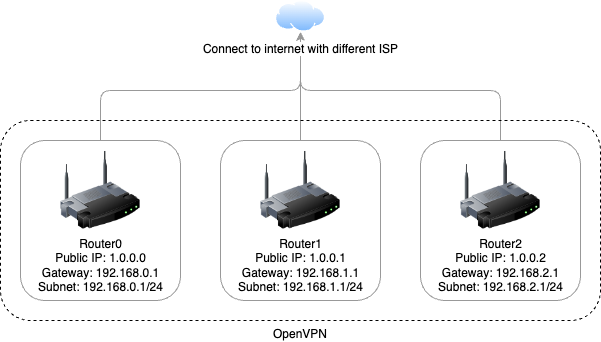
<p>First, let’s say we have 3 routers named router0, router1 and router2. And each of them has a different ISP connected. Networking settings show in the image below. Remember those network settings are made up for convenience. Put your setting into the router’s dashboard.</p>

<p><img src="/assets/img/in-post/2022-10-23-connect-multiple-asus-routers-via-openvpn/network-topology.drawio.png" alt="network-topology" /></p>

<ul>
  <li>Router0’s public IP is 1.0.0.0, the gateway is 192.168.0.1 and the subnet is 192.168.0.1/24.</li>
  <li>Router1’s public IP is 1.0.0.1, the gateway is 192.168.1.1 and the subnet is 192.168.1.1/24.</li>
  <li>Router2’s public IP is 1.0.0.2, the gateway is 192.168.2.1 and the subnet is 192.168.2.1/24.</li>
</ul>

<p>In this guide, not all routers need to have public IPs. But do need one for the server. For example, if router0 has a public IP, and others don’t. Then, router0 will be set as an OpenVPN server, others are OpenVPN clients.</p>

<h2 id="ddnsoptional">DDNS(optional)</h2>

<p>Unfortunately, some ISP don’t provide static public IP freely or even don’t provide dynamic public IP. There are 3 cases.</p>

<ol>
  <li>If you have a static public IP, you don’t need this part.</li>
  <li>If you have a dynamic public IP, you need to keep reading this part.</li>
  <li>If you have no public IP, please talk to your ISP or use frp/ngrok to get your service exposed to the public. And this guide may not fit your situation.</li>
</ol>

<p>DDNS is Dynamic DNS, which can dynamically update DNS records without the need for human interaction. If your public IP changes, the DNS of your domain keeps updating automatically.</p>

<p>As I said before, we’re using Asus’s official firmware. We’re going to use DDNS provided by Asus which is free.</p>

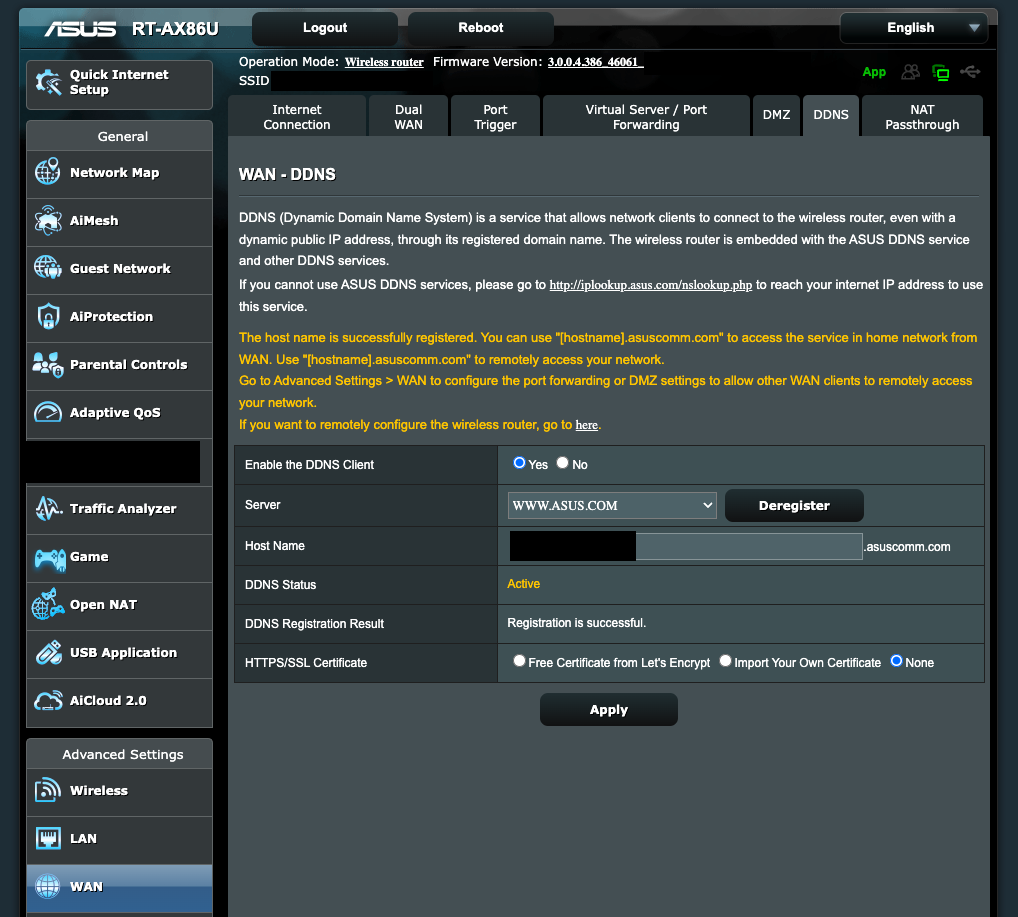
<p>Find <strong>WAN</strong> under advanced settings, and choose <strong>DDNS</strong> tab. By default, the <strong>Server</strong> choice is <code class="language-plaintext highlighter-rouge">WWW.ASUS.COM</code>. If not, select it. Enter the domain you want into the <strong>Host Name</strong> box then click <strong>Register</strong>. In this screenshot, I have registered, so it shows <strong>Deregister</strong> button. If the domain name you want is already registered, then it will indicate a failure. You can only choose an alternative domain name that is not registered. <a href="http://iplookup.asus.com/nslookup.php">http://iplookup.asus.com/nslookup.php</a> is a quick way to test if your domain is taken.</p>

<p><img src="/assets/img/in-post/2022-10-23-connect-multiple-asus-routers-via-openvpn/asus-ddns-setting.png" alt="asus-ddns-setting" /></p>

<p>If everything goes well, a domain has been created and pointed to your router’s public IP. Let’s say the domain is <code class="language-plaintext highlighter-rouge">example.asuscomm.com</code>.</p>

<h2 id="config-on-server">Config on server</h2>

<p>Find <strong>VPN</strong> under advanced settings. And choose <strong>VPN Server</strong> and <strong>OpenVPN</strong>.</p>

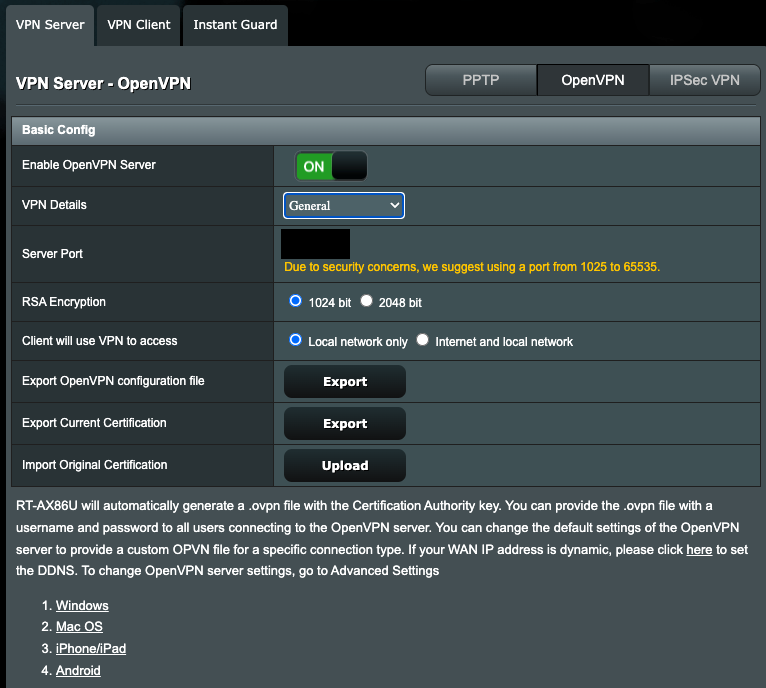
<p>The only thing that needs to do here is to set the server port to whatever you like. Let’s say set <strong>10000</strong> as the server port for example.</p>

<p><img src="/assets/img/in-post/2022-10-23-connect-multiple-asus-routers-via-openvpn/asus-openvpn-server-basic-config-port.png" alt="asus-openvpn-server-basic-config-port" /></p>

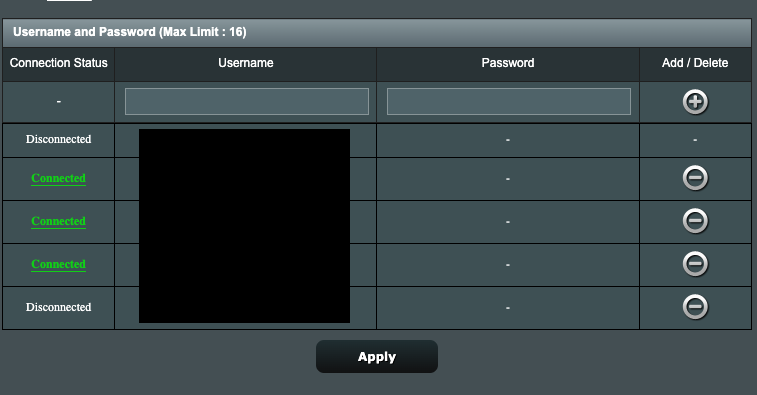
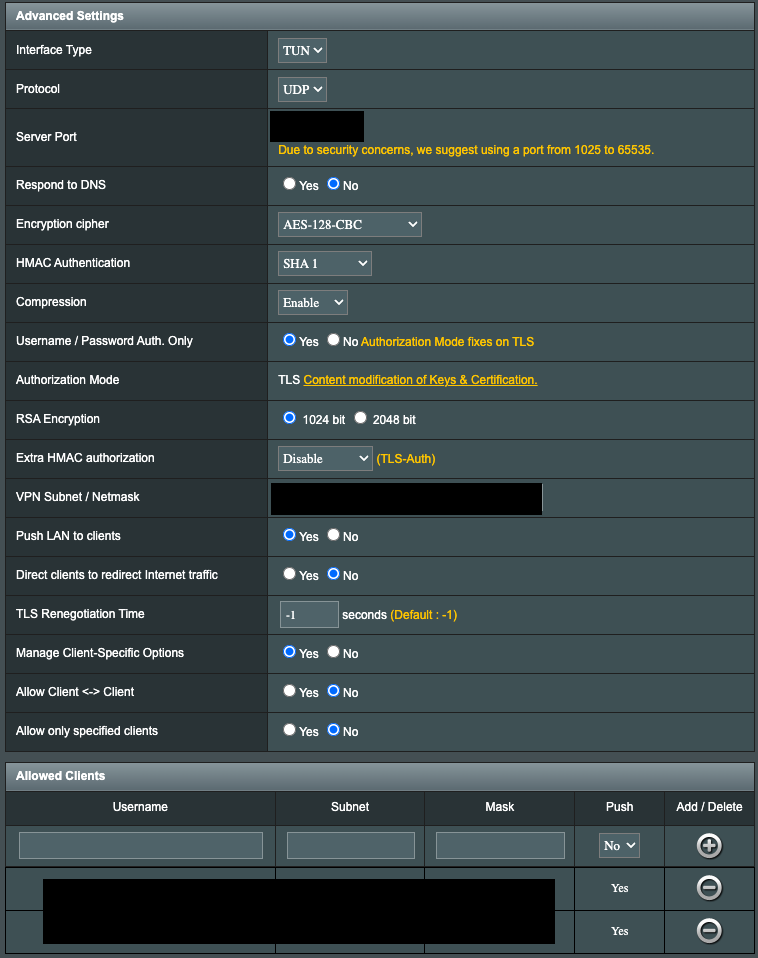
<p>Then scroll down and add the client’s username and password. In this guide, we have other 2 routers as clients. So add 2 accounts here.</p>

<ul>
  <li>username: router1, password: router1password</li>
  <li>username: router2, password: router2password</li>
</ul>

<p>Don’t forget to click the <strong>Apply</strong> button, if not the config won’t be activated.</p>

<p><img src="/assets/img/in-post/2022-10-23-connect-multiple-asus-routers-via-openvpn/asus-openvpn-add-client.png" alt="asus-openvpn-add-client" /></p>

<p>Then go do <strong>VPN Details</strong> and change <strong>General</strong> to <strong>Advanced Setings</strong>, you will find more settings.</p>

<p>There are 4 things to do:</p>

<ol>
  <li>Check if the <strong>Server Port</strong> is the one you set before.</li>
  <li>Change <strong>Username / Password Auth. Only</strong> from <strong>No</strong> to <strong>Yes</strong></li>
  <li>Change the **VPN Subnet / Netmask, keeping the default is acceptable.</li>
  <li>Add client routers into <strong>Allowed Clients</strong>.
    <ul>
      <li>username: router1, subnet: 192.168.1.1, mask: 255.255.255.0</li>
      <li>username: router2, subnet: 192.168.2.1, mask: 255.255.255.0</li>
    </ul>
  </li>
</ol>

<p><img src="/assets/img/in-post/2022-10-23-connect-multiple-asus-routers-via-openvpn/asus-openvpn-advanced-settings.png" alt="asus-openvpn-advanced-settings" /></p>

<p>Then you need to export client’s config. Change <strong>VPN Details</strong> from <strong>Advanced Settings</strong> to <strong>General</strong>. And click <strong>export</strong> of <strong>Export OpenVPN configuration file</strong>. You will get a config file named <code class="language-plaintext highlighter-rouge">client.ovpn</code> by default. Then open this file and look at the first line. By default it will look like this:</p>
<div class="language-plaintext highlighter-rouge"><div class="highlight"><pre class="highlight"><code>remote 1.1.1.1(you public ip)
</code></pre></div></div>
<p>Change <code class="language-plaintext highlighter-rouge">1.1.1.1</code> to your DDNS domain/url like <code class="language-plaintext highlighter-rouge">example.asuscomm.com</code>.</p>

<h2 id="config-on-client">Config on client</h2>

<p>It’s easy on client’s side. Just go to VPN page choose <strong>VPN Client</strong> -&gt; <strong>Add profile</strong> -&gt; Input <strong>Username</strong>, <strong>Password</strong> and upload your modified <code class="language-plaintext highlighter-rouge">client.ovpn</code>. Click <strong>OK</strong> and if this file is not activated click <strong>Activate</strong></p>

<h2 id="in-the-end">In the end</h2>

<p>Everything is done, enjoy your custom sd-wan.</p>

<p>If you encounter any problems following this tutorial, feel free to leave a comment.</p>]]></content><author><name></name></author><summary type="html"><![CDATA[Connect multiple Asus routers via OpenVPN]]></summary></entry><entry><title type="html">Redisson distributed lock watch dog mechanism</title><link href="https://caltong.com/2022/04/26/redisson-distributed-lock-watch-dog-mechanism.html" rel="alternate" type="text/html" title="Redisson distributed lock watch dog mechanism" /><published>2022-04-26T04:05:48+00:00</published><updated>2022-04-26T04:05:48+00:00</updated><id>https://caltong.com/2022/04/26/redisson-distributed-lock-watch-dog-mechanism</id><content type="html" xml:base="https://caltong.com/2022/04/26/redisson-distributed-lock-watch-dog-mechanism.html"><![CDATA[<h1 id="redisson-distributed-lock-watch-dog-mechanism">Redisson distributed lock watch dog mechanism</h1>

<p>Found this exception when using Redisson to implement the distributed lock:</p>

<div class="language-plaintext highlighter-rouge"><div class="highlight"><pre class="highlight"><code>java.lang.IllegalMonitorStateException: attempt to unlock lock, not locked by current thread by node id: d8fa7ae5-3152-468a-8793-6102b512df68 thread-id: 1
</code></pre></div></div>

<p>It happens when trying to unlock a lock that is already unlocked.
It can be reproduced by the codes below.</p>

<div class="language-plaintext highlighter-rouge"><div class="highlight"><pre class="highlight"><code>@Test
public void reproduce() throws InterruptedException {
    RLock lock = redissonClient.getLock("reproduce");
    lock.lock(5,TimeUnit.SECONDS);
    Thread.sleep(6000);
    try{
        lock.unlock();
        Assert.fail();
    }catch (IllegalMonitorStateException e){
        System.out.println(e);
    }
}
</code></pre></div></div>

<p>For the sake of code robustness, we need to catch this exception when unlocking a lock.</p>

<div class="language-plaintext highlighter-rouge"><div class="highlight"><pre class="highlight"><code>@Test
public void fix() throws InterruptedException {
    RLock lock = redissonClient.getLock("fix");
    lock.lock(5,TimeUnit.SECONDS);
    Thread.sleep(6000);
    try {
        lock.unlock();
    }catch (IllegalMonitorStateException e){
        System.out.println("Lock has expired already.");
    }
}
</code></pre></div></div>

<p>The code above shows us the problem when setting a lock with a specific timeout value.
But if we don’t set a timeout value, then this lock won’t be released by default from redisson.
The Redis locks with no expiration time may cause deadlock issues when the thread has some exceptions.
Redisson provides us with a watchdog to avoid the deadlock issue.
It makes codes a lot more simple for us.
No need to worry about the deadlock issue.
The code below shows us the source code of the mechanism of the watchdog.</p>

<div class="language-plaintext highlighter-rouge"><div class="highlight"><pre class="highlight"><code>@Test
public void watchDog() throws InterruptedException {
    RLock lock = redissonClient.getLock("watchDog");
    lock.lock();
    for (int i = 0; i &lt; 30; i++) {
        Thread.sleep(1000);
        System.out.println(lock.remainTimeToLive());
    }
}
</code></pre></div></div>

<p>The output is:</p>

<div class="language-plaintext highlighter-rouge"><div class="highlight"><pre class="highlight"><code>28978
27958
26936
25914
24891
23872
22854
21835
20816
29883
28864
27845
26827
25818
24810
23792
22784
21772
20758
29845
28831
27821
26801
25783
24766
23756
22739
21721
20712
29791
</code></pre></div></div>

<p>We can see that although the code does not explicitly specify the lock expiration time,
Redisson sets it to 30 seconds by default, and then every 10 seconds,
the lock expiration time will be renewed for 10 seconds,
that is, as long as the lock-holding thread does not release the lock voluntarily or an exception occurs,
then the lock will not be released.
This is guaranteed by Redisson’s watchdog mechanism.</p>

<p>We can get this code from Redisson config file:</p>

<div class="language-plaintext highlighter-rouge"><div class="highlight"><pre class="highlight"><code>/**
    * This parameter is only used if lock has been acquired without leaseTimeout parameter definition. 
    * Lock expires after &lt;code&gt;lockWatchdogTimeout&lt;/code&gt; if watchdog 
    * didn't extend it to next &lt;code&gt;lockWatchdogTimeout&lt;/code&gt; time interval.
    * &lt;p&gt;  
    * This prevents against infinity locked locks due to Redisson client crush or 
    * any other reason when lock can't be released in proper way.
    * &lt;p&gt;
    * Default is 30000 milliseconds
    * 
    * @param lockWatchdogTimeout timeout in milliseconds
    * @return config
    */
public Config setLockWatchdogTimeout(long lockWatchdogTimeout) {
    this.lockWatchdogTimeout = lockWatchdogTimeout;
    return this;
}
</code></pre></div></div>

<p>As you can see, the watchdog mechanism only intervenes when <code class="language-plaintext highlighter-rouge">leaseTimeout</code> is not set,
as we can see from the source code below:</p>

<div class="language-plaintext highlighter-rouge"><div class="highlight"><pre class="highlight"><code>private void renewExpiration() {
    ExpirationEntry ee = EXPIRATION_RENEWAL_MAP.get(getEntryName());
    if (ee == null) {
        return;
    }

    Timeout task = commandExecutor.getConnectionManager().newTimeout(new TimerTask() {
        @Override
        public void run(Timeout timeout) throws Exception {
            ExpirationEntry ent = EXPIRATION_RENEWAL_MAP.get(getEntryName());
            if (ent == null) {
                return;
            }
            Long threadId = ent.getFirstThreadId();
            if (threadId == null) {
                return;
            }
            
            RFuture&lt;Boolean&gt; future = renewExpirationAsync(threadId);
            future.whenComplete((res, e) -&gt; {
                if (e != null) {
                    log.error("Can't update lock " + getRawName() + " expiration", e);
                    EXPIRATION_RENEWAL_MAP.remove(getEntryName());
                    return;
                }
                
                if (res) {
                    // reschedule itself
                    renewExpiration();
                } else {
                    cancelExpirationRenewal(null);
                }
            });
        }
    }, internalLockLeaseTime / 3, TimeUnit.MILLISECONDS);

    ee.setTimeout(task);
    }
</code></pre></div></div>

<p>By default, the lock will be renewed after <code class="language-plaintext highlighter-rouge">internalLockLeaseTime / 3, TimeUnit.MILLISECONDS</code>,
which is 30/3 seconds after the default setting.</p>]]></content><author><name></name></author><summary type="html"><![CDATA[Redisson distributed lock watch dog mechanism]]></summary></entry><entry><title type="html">PostgreSQL Performance Test Using UUID as Primary Key</title><link href="https://caltong.com/2022/02/24/postgre-sql-performance-test-using-uuid-as-primary-key.html" rel="alternate" type="text/html" title="PostgreSQL Performance Test Using UUID as Primary Key" /><published>2022-02-24T04:05:48+00:00</published><updated>2022-02-24T04:05:48+00:00</updated><id>https://caltong.com/2022/02/24/postgre-sql-performance-test-using-uuid-as-primary-key</id><content type="html" xml:base="https://caltong.com/2022/02/24/postgre-sql-performance-test-using-uuid-as-primary-key.html"><![CDATA[<h1 id="postgresql-performance-test-using-uuid-as-primary-key">PostgreSQL Performance Test Using UUID as Primary Key</h1>

<h2 id="environmental-preparation">Environmental preparation</h2>

<p>In order to compare the difference between HDD and SSD,
the HDD and SSD are tested separately,
and the machine is an ESXi virtual machine with the same configuration:</p>

<ul>
  <li>CPU：2 cores</li>
  <li>RAM：4G</li>
  <li>Disk：32G(HDD/SSD)from H710 card with 1G cache</li>
  <li>PostgreSQL：psql (10.20 (Ubuntu 10.20-1.pgdg20.04+1))</li>
</ul>

<p>Create table</p>

<div class="language-plaintext highlighter-rouge"><div class="highlight"><pre class="highlight"><code>--Unordered uuid
pgbenchdb=# create table test_uuid_v4(id char(32) primary key);
CREATE TABLE
--Ordered uuid
pgbenchdb=# create table test_time_nextval(id char(32) primary key);
CREATE TABLE
--Increasing sequence
pgbenchdb=# create table test_seq_bigint(id int8 primary key);
CREATE TABLE
--Creating sequence
create sequence test_seq start with 1 ;
</code></pre></div></div>

<p>Test file</p>

<div class="language-plaintext highlighter-rouge"><div class="highlight"><pre class="highlight"><code>--Testing the unordered uuid
vi pgbench_uuid_v4.sql
insert into test_uuid_v4 (id) values (replace(uuid_generate_v4()::text,'-',''));
--Testing ordered uuid
vi pgbench_time_nextval.sql
insert into test_time_nextval (id) values (replace(uuid_time_nextval()::text,'-',''));
--Test sequence
vi pgbench_seq_bigint.sql
insert into test_seq_bigint (id) values (nextval('test_seq'::regclass));
</code></pre></div></div>

<p>Run test</p>

<div class="language-plaintext highlighter-rouge"><div class="highlight"><pre class="highlight"><code>pgbench -M prepared -r -n -j 8 -c 8 -T 60 -f ./pgbench_uuid_v4.sql -U sa pgbenchdb 
</code></pre></div></div>

<div class="language-plaintext highlighter-rouge"><div class="highlight"><pre class="highlight"><code>pgbenchdb=# insert into test_uuid_v4 (id) select  replace(uuid_generate_v4()::text,'-','') from generate_series(1,1000000);
INSERT 0 1000000
Time: 43389.817 ms (00:43.390)
pgbenchdb=# insert into test_time_nextval (id) select replace(uuid_time_nextval()::text,'-','') from generate_series(1,1000000);
INSERT 0 1000000
Time: 30585.134 ms (00:30.585)
pgbenchdb=#  insert into test_seq_bigint select generate_series (1,1000000);
INSERT 0 1000000
Time: 9818.639 ms (00:09.819)
Unordered uuid insertion for 100w takes 43s, ordered takes 30s, and sequential takes 10s.
</code></pre></div></div>]]></content><author><name></name></author><summary type="html"><![CDATA[PostgreSQL Performance Test Using UUID as Primary Key]]></summary></entry></feed>